
All articles
SEO
8 min read
How to get your website into ChatGPT, Perplexity and Google AI Overviews
AI search tools only recommend websites they can find, read and trust. Here are the practical steps to make your site show up in ChatGPT, Perplexity, Copilot and Google's AI answers.
AI search tools such as ChatGPT search, Perplexity, Microsoft Copilot and Google’s AI Overviews build their answers from web pages they can crawl and trust. To appear in those answers, your site needs to be indexed by Google and Bing, open to the right crawlers, written in clear answer-first language, marked up with structured data, and mentioned on other trusted websites.
None of this needs a big budget. Most of it is the same good SEO that has always worked, with a few new details. Here is exactly what to do.
How AI search tools find websites
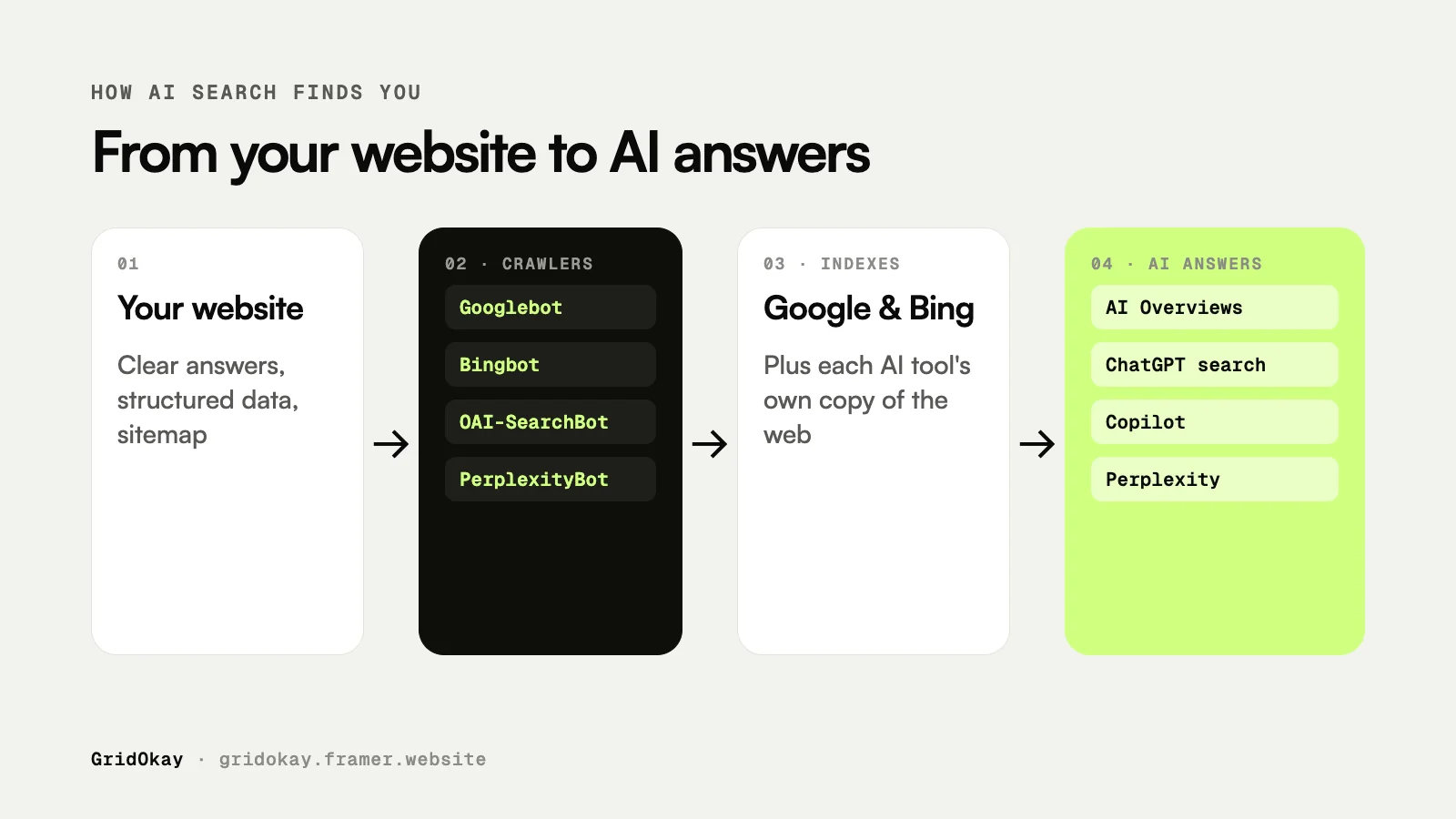
Every AI search tool needs a copy of the web to read from. Some run their own crawler, and most also lean on a traditional search index. That is why classic SEO still matters so much.
AI tool | Where it gets pages | What you should do |
|---|---|---|
Google AI Overviews and AI Mode | Google’s search index (Googlebot) | Get indexed in Google Search Console |
ChatGPT search | OpenAI’s crawler (OAI-SearchBot) plus search partners such as Bing | Allow OAI-SearchBot and get indexed in Bing |
Microsoft Copilot | Bing’s search index | Get indexed in Bing Webmaster Tools |
Perplexity | Its own crawler (PerplexityBot) plus other sources | Allow PerplexityBot |
Step 1: get indexed by Google and Bing
If search engines do not know your site exists, AI tools built on them will not either.
Add your site to Google Search Console, verify it, and submit your sitemap. On Framer and Webflow the sitemap lives at yoursite.com/sitemap.xml.
Add your site to Bing Webmaster Tools. The fastest way is to import it from Google Search Console, which copies your site and sitemap across in a minute.
Use the URL inspection tool in Search Console to request indexing for your most important pages.
Indexing usually takes a few days to a few weeks for a new site.
Step 2: let the right crawlers in
Your robots.txt file tells crawlers what they may read. Open yoursite.com/robots.txt and check that you are not blocking the bots that power search:
Googlebot for Google Search and AI Overviews
Bingbot for Bing and Copilot
OAI-SearchBot for ChatGPT search
PerplexityBot for Perplexity
Two details trip people up. GPTBot is OpenAI’s crawler for training models, which is separate from OAI-SearchBot, so blocking GPTBot does not remove you from ChatGPT search. And Google-Extended controls whether Google can use your content for Gemini training, not whether you appear in AI Overviews.
Framer and Webflow allow all crawlers by default, so most sites built on them are already fine.
Step 3: write content AI can quote
AI tools pull out short, self-contained passages that answer a question directly. Make that easy for them.
Answer first. Put the direct answer in the first one or two sentences, then explain.
Use question headings. Headings like “How much does a website cost?” match the way people ask AI tools.
Be specific. Real numbers, prices, timeframes and steps are far more quotable than vague claims.
Use tables and lists. Comparisons and step-by-step instructions are easy to extract.
Show who you are. Name your business, explain your experience and keep pages up to date.
You can see this structure in our guide to what a website costs in 2026.
Step 4: add structured data
Structured data is hidden code, usually JSON-LD, that tells search engines exactly what a page is about: your business name, products, prices, articles and FAQs. It removes guesswork for both search engines and AI tools.
The most useful types for a small business site are Organization, Product or Service, Article for blog posts, and BreadcrumbList. Test your pages with Google’s Rich Results Test to make sure the markup is valid.
Step 5: get mentioned on other websites
This is the step most people skip, and it matters a lot. AI tools trust what several independent sources say about you more than what your own site says.
Use the same business name and the same one-line description everywhere.
Fill in your profiles on relevant platforms, such as marketplaces, directories, LinkedIn, Dribbble or Behance.
Answer questions in communities like Reddit and industry forums, and link to your site only when it genuinely helps.
Ask bloggers who publish “best of” lists in your niche to include you.
Publish short videos. YouTube pages are often cited in AI answers.
Step 6: make pages readable without JavaScript
Some AI crawlers do not run JavaScript. If your text only appears after scripts load, they may see an empty page. Sites built on Framer and Webflow are rendered on the server, so the text is in the HTML from the start.
How to check if you appear in AI search
Ask ChatGPT, Perplexity and Copilot the questions your customers ask, and see whether you are mentioned.
Watch the Performance report in Google Search Console. AI Overviews traffic is included in your search data.
Look in your analytics for visits from chatgpt.com, perplexity.ai and copilot.microsoft.com.
What does not work
Keyword stuffing, mass-produced AI articles and bought links do not help, and they can hurt. llms.txt is a proposed standard, but the major AI search tools do not rely on it today, so it should not be your priority. Focus on being findable, clear and genuinely useful.
Frequently asked questions
How long does it take to appear in AI search?
Usually weeks to a few months. Indexing takes days to weeks, and AI tools start citing you once your pages and mentions build up trust.
Do I have to pay to appear in AI answers?
No. There is no paid placement in AI Overviews or ChatGPT search answers today. Visibility comes from the same work as organic SEO.
Does structured data guarantee I will be cited?
No, but it makes your pages easier to understand, which improves your chances. Think of it as removing obstacles rather than a shortcut.
Are Framer and Webflow sites good for AI search?
Yes. Both render pages on the server, generate a sitemap, let you edit page titles and descriptions, and allow crawlers by default. Every GridOkay template is built SEO-ready on top of that.

Written by GridOkay
Framer & Webflow templates and custom websites

Ready when you are
Your next website starts here.
Pick a template and launch this week, or tell us about your project and we’ll build it for you.